 3d24023af3
- Added linked table of contents grouped by section
- Converted toolkit comparison into a table
- Added "back to top" links after each entry
- Standardized heading levels and spacing
- No content changes — reorganized for readability
33 KiB
Dear ImGui — Frequently Asked Questions (FAQ)
Short link: https://www.dearimgui.com/faq Source: https://github.com/ocornut/imgui/blob/master/docs/FAQ.md
Table of Contents
Basics
- Where is the documentation?
- What is this library called?
- Dear ImGui vs. traditional UI toolkits
- Which version should I get?
Integration
- How to get started?
- Should input go to Dear ImGui or my application?
- How can I enable keyboard or gamepad controls?
- Using Dear ImGui without a mouse, keyboard, or screen
- How can I create my own backend?
- Little squares showing instead of text
- Elements clipping / displaying outside window boundaries
Usage
- The ID Stack system
- How can I display an image? (ImTextureID / ImTextureRef)
- Math operators with ImVec2
- Using your own math types
- Interacting with std::string / std::vector
- Displaying custom shapes (ImDrawList)
Fonts & Text
- Handling DPI
- Loading a different font
- Using icon fonts
- Loading multiple fonts
- Non-Latin characters (CJK, Cyrillic, etc.)
Concerns
- Who uses Dear ImGui?
- Can you build serious tools with it?
- Can you reskin the look of Dear ImGui?
- Why C++ instead of C?
Community
Basics
Where is the documentation?
The library assumes familiarity with C/C++ and documentation is spread across several places:
| Resource | Link |
|---|---|
| Wiki hub | Wiki |
| Getting started guide | Getting Started |
| Example apps (20+) | examples/ |
| Live demo code | imgui_demo.cpp → ImGui::ShowDemoWindow() |
| Interactive web demo | imgui_explorer |
| Backend docs | BACKENDS.md |
| Examples docs | EXAMPLES.md |
| Font docs | FONTS.md |
| API comments | Top of imgui.cpp and imgui.h |
| Terminology | Glossary |
| Past Q&A | Issues / Discussions |
| Debug tool | ImGui::ShowMetricsWindow() — exposes internal state, useful for understanding concepts even outside debugging |
Your IDE is also your friend: jump to a type or function's declaration to find its doc comment.
What is this library called?
Dear ImGui — not "ImGui", not "IMGUI".
The project started in 2014 without a distinct name. Since "IMGUI" (immediate-mode graphical user interface) is a generic term used by many implementations (e.g. Unity has its own), the author adopted the fully-qualified name "Dear ImGui" in December 2015 to reduce ambiguity without breaking existing codebases.
Dear ImGui vs. traditional UI toolkits
| Dear ImGui | Qt / GTK / WPF, etc. |
|---|---|
| UI is fully re-issued every update. | UI is issued once, then modified. |
| Layout is fully dynamic and can change at any time — well suited to reflecting dynamic data. | Layout is mostly static; reflecting dynamic data needs extra, often tedious code. |
| Optimized for the worst case (frequent changes). | Optimized for the case where nothing changes; perf degrades as things change. |
| Application submits UI based on arbitrary logic without bookkeeping. | Application must bookkeep UI elements. |
| Library stores minimal state; some layout features (alignment, resizing) need ad-hoc code as a result. | Library stores the full widget tree/state, easing certain layouts. |
| UI code can live anywhere — even to edit a local variable. | UI code must live in dedicated spots. |
| Layout, logic, actions, and data all sit near each other in code. | These are spread across files/functions/formats. |
| Data stays naturally synchronized. | Requires callbacks/signals/slots (error-prone). |
| Simple, easy-to-learn API; approachable to more programmers. | More complex, specialized API. |
| Low-level API using your own/raw types. | Higher-level API, more abstractions. |
| Less polished look by default (improving over time). | Standard native look and feel. |
| Compiled from source — easy to debug/hack/study. | Usually precompiled — harder to study or modify. |
| Runs everywhere, including web, consoles, mobile, legacy systems. | Runs on major desktop platforms. |
Idiomatic Dear ImGui:
if (ImGui::Button("Save"))
    MySaveFunction();

ImGui::SliderFloat("Slider", &m_MyValue, 0.0f, 1.0f);
Idiomatic traditional toolkit:
UiButton* button = new UiButton("Save");
button->OnClick = &MySaveFunction;
parent->Add(button);

UiSlider* slider = new UiSlider("Slider");
slider->SetRange(0.0f, 1.0f);
slider->BindData<float>(&m_MyValue);
parent->Add(slider);
This table is a simplification — the trade-offs run deeper. There's no universally agreed definition of "IMGUI," partly because most popular implementations grew out of game-industry needs and people conflate a specific library's properties with the paradigm itself. One way to define it:
IMGUI refers to the API — the interface between application and UI system. It favors the application owning its data as the single source of truth, minimizes retained state on both sides, and keeps data synchronization natural. It does not refer to the implementation — what happens inside the UI library doesn't matter.
See also: articles about the IMGUI paradigm.
Which version should I get?
Releases are tagged occasionally with changelogs, but syncing to master is generally safe and recommended — the library is stable and regressions are fixed quickly.
Advanced users may prefer the docking branch, which adds:
It's used by many projects and kept regularly in sync with master.
Integration
How to get started?
- Getting Started wiki guide
- docs/EXAMPLES.md
- docs/BACKENDS.md
- The
PROGRAMMER GUIDEsection at the top of imgui.cpp - The Wiki generally
Stuck on compiling, linking, running, or fonts? Ask in GitHub Discussions.
Should input go to Dear ImGui or my application?
Check the io.WantCaptureMouse, io.WantCaptureKeyboard, and io.WantTextInput flags on ImGuiIO:
io.WantCaptureMouseset → discard/hide mouse input from your app.io.WantCaptureKeyboardset → discard/hide keyboard input from your app.io.WantTextInputset → good time to pop up an on-screen keyboard (mobile/console).
Important: always forward raw mouse/keyboard input to Dear ImGui regardless of these flags — it needs the full stream to, e.g., detect clicks outside its own windows.
void MyLowLevelMouseButtonHandler(int button, bool down)
{
    // (1) ALWAYS forward mouse data to ImGui! Automatic with default backends. With a custom backend:
    ImGuiIO& io = ImGui::GetIO();
    io.AddMouseButtonEvent(button, down);

    // (2) ONLY forward to your app/game if ImGui doesn't want it.
    if (!io.WantCaptureMouse)
        my_game->HandleMouseData(...);
}
Notes:
io.WantCaptureMouseis more reliable than manually checking "is the mouse over a window" — it correctly handles dragging (started inside or outside ImGui) and popup/modal blocking.- Text input releases focus on the Return key's "KeyDown" event, so the following "KeyUp" may arrive with
io.WantCaptureKeyboard == false. If that's inconvenient, track which key-downs targeted Dear ImGui (e.g., a bool array) and filter the matching key-ups.
How can I enable keyboard or gamepad controls?
- Gamepad/keyboard navigation is actively developed and improving. It's especially useful for console platforms (PS4, Switch, Xbox One) without a mouse.
- Keyboard:
io.ConfigFlags |= ImGuiConfigFlags_NavEnableKeyboard - Gamepad:
io.ConfigFlags |= ImGuiConfigFlags_NavEnableGamepad(needs a supporting backend) - Reference: Gamepad control sheets (PS4, XB1, Switch)
- Details:
USING GAMEPAD/KEYBOARD NAVIGATION CONTROLSsection in imgui.cpp
Using Dear ImGui without a mouse, keyboard, or screen
- Share your computer's mouse/keyboard with a console/tablet/phone via Synergy — the preferred option for dev productivity. The micro-synergy-client repo has a small, portable client (uSynergy.c/.h) implementing the Synergy 1.x protocol; pair it with a Synergy 1 server. Console SDKs sometimes offer similar tooling.
- On consoles, emulate a mouse cursor with a touchpad or spare analog stick as a fallback.
- For remote/screen-less rendering, third-party solutions send vertices over the network: netImgui, Remote ImGui, imgui-ws. See the Wiki for more.
- For touch input, increase widget hit boxes via
style.TouchPadding, though a mouse or gamepad is still recommended for precision and screen real estate.
How can I create my own backend?
See docs/BACKENDS.md and the documentation at the top of imgui.cpp.
Little squares showing instead of text
Your renderer backend isn't using the font texture correctly, or it was never uploaded to the GPU.
- Standard backend, before 1.92: (a) did you modify the font atlas after
ImGui_ImplXXX_NewFrame()? (b) the texture upload may have failed, which can happen if the atlas is too large — see docs/FONTS.md. - Standard backend, after 1.92: please file a report — this shouldn't happen.
- Custom backend: confirm the font texture is uploaded to the GPU and that shader/render state is set up correctly (texture bound, etc.). Compare against an existing backend, and use a graphics debugger like RenderDoc.
Elements clipping / displaying outside window boundaries
Usually a mishandled clipping rectangle in your render function.
Each draw command's clip rectangle (ImDrawCmd->ClipRect) is defined as (x1=left, y1=top, x2=right, y2=bottom) — not (x1, y1, width, height).
See any backend in backends/ for reference. DirectX11 example:
// Project scissor/clipping rectangles into framebuffer space
ImVec2 clip_off = draw_data->DisplayPos;
ImVec2 clip_min(pcmd->ClipRect.x - clip_off.x, pcmd->ClipRect.y - clip_off.y);
ImVec2 clip_max(pcmd->ClipRect.z - clip_off.x, pcmd->ClipRect.w - clip_off.y);
if (clip_max.x <= clip_min.x || clip_max.y <= clip_min.y)
    continue;

// Apply scissor/clipping rectangle
const D3D11_RECT r = { (LONG)clip_min.x, (LONG)clip_min.y, (LONG)clip_max.x, (LONG)clip_max.y };
ctx->RSSetScissorRects(1, &r);
Usage
The ID Stack system
The #1 user mistake is reusing the same label/ID. An empty label behaves the same as reusing the parent widget's label.
TL;DR
- Widget labels also compute the widget's unique ID.
- IDs are a hash of the label plus the enclosing scope (parent window, tree node, etc.).
PushID()appends to the ID stack without affecting visible text."##something"in a label appends to the ID without showing."###something"makes the ID ignore the visible part of the label entirely.
Common mistake vs. fixes:
ImGui::Begin("Incorrect!");
ImGui::DragFloat2("My value", &objects[0]->pos.x);
ImGui::DragFloat2("My value", &objects[1]->pos.x);  // ID collision!
ImGui::DragFloat2("My value", &objects[2]->pos.x);  // ID collision!
ImGui::End();

ImGui::Begin("Correct!");
ImGui::DragFloat2("My value", &objects[0]->pos.x);
ImGui::DragFloat2("My value##2", &objects[1]->pos.x);
ImGui::DragFloat2("My value##3", &objects[2]->pos.x);
ImGui::End();

ImGui::Begin("Also Correct!");
for (int n = 0; n < 3; n++)
{
    ImGui::PushID(n);
    ImGui::DragFloat2("My value", &objects[n]->pos.x);
    ImGui::PopID();
}
ImGui::End();
Multiple widgets, same visible label
Local/scoped fix using ##:
Button("Play");        // ID = hash("MyWindow", "Play")
Button("Play##foo1");  // ID = hash("MyWindow", "Play##foo1")
Button("Play##foo2");  // ID = hash("MyWindow", "Play##foo2")
General fix using PushID() / PopID():
for (int i = 0; i < 100; i++)
{
  MyObject* obj = Objects[i];
  PushID(obj->Name);
  Button("Click");     // ID = hash("Window", obj->Name, "Click")
  PopID();
}
for (int i = 0; i < 100; i++)
{
  PushID(i);
  Button("Click");     // ID = hash("Window", i, "Click")
  PopID();
}
Widgets with no visible label
Checkbox("##On", &b); // No visible label, still has a unique ID
Dynamic labels with a stable ID
Use ### to exclude the visible part from ID computation, so animated/changing text doesn't lose associated state (focus, open/closed, etc.):
Button("Hello###ID");   // Label = "Hello",   ID = hash(..., "ID")
Button("World###ID");   // Label = "World",   ID = hash(..., "ID")  — same ID, different text
char buf[128];
sprintf(buf, "My game (%.1f FPS)###MyGame", io.Framerate);
ImGui::Begin(buf); // Window ID stays constant even as the title text animates

if (ImGui::Button(enabled ? "Disable###MyButton" : "Enable###MyButton", { -FLT_MIN, 0.0f }))
    enabled = !enabled;

ImGui::End();
(Tip: wrap sprintf in a small helper, e.g. ocornut/Str.)
How the ID stack actually works
Interactive widgets need a unique ID, built from a hash of the "path" of labels/scopes leading to them. Use Demo > Tools > ID Stack Tool (or ImGui::ShowIDStackToolWindow()) to inspect this live.
Begin("MyWindow");
Button("OK");          // ID = hash("MyWindow", "OK")
Button("Cancel");      // ID = hash("MyWindow", "Cancel")
End();
Nested scopes (tree nodes, etc.) extend the path:
Begin("MyWindow");
if (TreeNode("MyTreeNode"))
{
    Button("OK");      // ID = hash("MyWindow", "MyTreeNode", "OK")
    TreePop();
}
End();
Same label in different scopes doesn't collide:
Begin("MyFirstWindow"); Button("OK"); End(); // hash("MyFirstWindow", "OK")
Begin("MyOtherWindow"); Button("OK"); End(); // hash("MyOtherWindow", "OK")
Same ID twice in the same scope does collide:
Begin("MyWindow");
Button("OK");
Button("OK");      // ERROR: collides with the first button
Button("");        // ERROR: collides with Begin("MyWindow")
End();
PushID() / PopID() accept a pointer, string, or integer, and can be stacked:
Button("Click");       // ID = hash(..., "Click")
PushID("node");
  Button("Click");     // ID = hash(..., "node", "Click")
  PushID(my_ptr);
    Button("Click");   // ID = hash(..., "node", my_ptr, "Click")
  PopID();
PopID();
Tree nodes push their own scope implicitly:
Button("Click");       // ID = hash(..., "Click")
if (TreeNode("node"))  // implicitly calls PushID(), unless told not to
{
  Button("Click");     // ID = hash(..., "node", "Click")
  TreePop();
}
For tree open/close state specifically: a stable string ID preserves state when the tracked object changes; indices or pointers preserve state differently when iterating a list. Pick whichever fits your use case.
How can I display an image? (ImTextureID / ImTexturRef)
Short version
- Use
ImGui::Image(),ImGui::ImageButton(), or the lower-levelImDrawList::AddImage()to draw your own textures. - See Image Loading and Displaying Examples for loading/display recipes.
- Textures are identified by an opaque
ImTextureIDvalue, meaning is entirely up to you/your engine. - Default
ImTextureIDholds up to 64 bits; redefine it via#definefor a custom type if needed. - Loading images from disk into a texture is deliberately outside Dear ImGui's scope (see the linked examples for that).
ImTextureID vs. ImTextureRef
ImTextureRef (added June 2025, in 1.92) is now what all drawing functions accept and what's stored in ImDrawCmd.
- If you manage your own textures, you'll mostly only ever touch
ImTextureID, trivially convertible toImTextureRef. - You only need
ImTextureRefdirectly when dealing with backend-managed textures (mainly the font atlas). - There's intentionally no implicit
ImTextureRef → ImTextureIDcast, since that conversion is lossy before rendering.
// ImTextureID — low-level, backend-specific texture identifier
#ifndef ImTextureID
typedef ImU64 ImTextureID;  // default: 64 bits, enough for a pointer or integer
#endif
Per-backend meaning of ImTextureID:
- OpenGL:
GLuint - DirectX9:
LPDIRECT3DTEXTURE9 - DirectX11:
ID3D11ShaderResourceView* - DirectX12:
D3D12_GPU_DESCRIPTOR_HANDLE
To use something other than a 64-bit value: #define ImTextureID MyTextureType* in imconfig.h. You can store a richer struct (texture + sampler + shader, etc.) as long as you implement ==/!=.
// ImTextureRef — higher-level identifier, valid even before GPU upload
struct ImTextureRef
{
    ImTextureRef()                          { _TexData = NULL; _TexID = ImTextureID_Invalid; }
    ImTextureRef(ImTextureID tex_id)        { _TexData = NULL; _TexID = tex_id; }
    inline ImTextureID  GetTexID() const    { return _TexData ? _TexData->TexID : _TexID; }

    ImTextureData*      _TexData;  //      Owned by ImFontAtlas; resolves to ImTextureID after upload.
    ImTextureID         _TexID;    // _OR_ Already-created backend texture id, passed to e.g. ImGui::Image().
};
- User-created textures store
ImTextureIDdirectly. - Backend-created textures (mainly the atlas) store a
ImTextureData*, resolved toImTextureIDafter upload — useImTextureData::GetTexRef()to build the ref. - For custom rectangles on the current atlas, use
io.Fonts->TexRef. - Binding authors for languages without constructors (e.g. C) should provide a helper like:
inline ImTextureRef ImTextureRefFromID(ImTextureID tex_id) { ImTextureRef tex_ref = { ._TexData = NULL, .TexID = tex_id }; return tex_ref; }
Longer explanation
Dear ImGui produces renderer-agnostic meshes (ImDrawList) made of textured polygons; your render function displays them at end of frame. Each backend picks a representation for "texture" that suits its API — the code to do so is typically a few dozen lines (see examples/).
If you have a custom engine, you can store something richer than a raw handle in ImTextureID — whatever fits your codebase's existing texture/material types. If you're new to OpenGL/DirectX/Vulkan, stick with the example backends' default choice.
// User code:
MyTexture* texture = g_CoffeeTableTexture;
ImGui::Image((ImTextureID)(intptr_t)texture, ImVec2(texture->Width, texture->Height));

// Later, in your render function:
MyTexture* texture = (MyTexture*)(intptr_t)pcmd->GetTexID();
MyEngineBindTexture2D(texture);
Casting examples:
GLuint my_tex = XXX;
ImTextureID my_imtexid = (ImTextureID)(intptr_t)my_tex;
my_tex = (GLuint)(intptr_t)my_imtexid;

ID3D11ShaderResourceView* my_dx11_srv = XXX;
ImTextureID my_imtexid = (ImTextureID)(intptr_t)my_dx11_srv;
my_dx11_srv = (ID3D11ShaderResourceView*)(intptr_t)my_imtexid;
Use ImGui::ShowMetricsWindow() to visualize how ImDrawLists are generated. For loading actual image files, see Image Loading and Displaying Examples.
Math operators with ImVec2
Not exported by default (to avoid clashing with your own math library). Opt in with:
#define IMGUI_DEFINE_MATH_OPERATORS
#include "imgui.h"
Using your own math types
Set IM_VEC2_CLASS_EXTRA / IM_VEC4_CLASS_EXTRA in imconfig.h to add implicit conversions to your own types (e.g. glm::vec2), so you can pass them directly wherever ImVec2/ImVec4 is expected.
Interacting with std::string / std::vector
- Dear ImGui avoids std C++ types entirely (uses
char*, notstd::string) to stay portable across languages, frameworks, and older/obscure platforms. - For
InputText()withstd::stringor similar, see misc/cpp/imgui_stdlib.h. - For combo/list boxes over
std::vectoror custom containers, useBeginCombo()/EndCombo()(or the list-box equivalent) to iterate and submit items yourself, rather than the olderCombo()/ListBox()API. - For most high-level types you can just reach the underlying raw data, or write small one-line wrappers in the
ImGui::namespace. - Heavy
std::stringuse in large UIs can hurt performance — small-string optimization helps but isn't standardized. Prefer literals, static buffers, or a lightweight string helper (e.g. ocornut/Str) if UI traversal cost becomes an issue.
Displaying custom shapes (ImDrawList)
ImGui::Begin("My shapes");

ImDrawList* draw_list = ImGui::GetWindowDrawList();
ImVec2 p = ImGui::GetCursorScreenPos();

draw_list->AddCircleFilled(ImVec2(p.x + 50, p.y + 50), 30.0f, IM_COL32(255, 0, 0, 255));
draw_list->AddLine(ImVec2(p.x, p.y), ImVec2(p.x + 100.0f, p.y + 100.0f), IM_COL32(255, 255, 0, 255), 3.0f);

ImGui::Dummy(ImVec2(200, 200)); // claim layout space so the window isn't tiny

ImGui::End();
- See "Demo > Examples > Custom Rendering" (
ShowExampleAppCustomRendering()inimgui_demo.cpp) for more. - Build colors with
IM_COL32(r,g,b,a)(compile-time), orImGui::GetColorU32(...)to respectstyle.Alpha. - If you've set up
IM_VEC2_CLASS_EXTRA, use your own math library's operators instead ofIMGUI_DEFINE_MATH_OPERATORS. ImGui::GetBackgroundDrawList()/GetForegroundDrawList()draw behind/over every window (per viewport) — handy for anything not tied to a specific window.- You can also create a borderless window (
NoBackground | NoDecoration | NoSavedSettings | NoInputs) purely as a drawing surface via itsGetWindowDrawList(). - Or build a fully independent
ImDrawListviaImGui::GetDrawListSharedData()and your own renderer call. - For inspiration (and cautionary tales), see the ImDrawList coding party 2020 thread.
Fonts & Text
Handling DPI
Since 1.92 (June 2025), fonts can be used dynamically at any size.
Scaling fonts
style.FontSizeBase = 20.0f;   // default size
style.FontScaleDpi = 2.0f;    // scale all fonts

ImGui::PushFont(NULL, 42.0f);      // size only, multiplied by FontScaleDpi
ImGui::PushFont(new_font, 42.0f);  // font + size
Docking branch / multi-viewport:
io.ConfigDpiScaleFonts = true;      // auto-update style.FontScaleDpi on monitor DPI change (fonts only, not padding/spacing — yet)
io.ConfigDpiScaleViewports = true;  // scale ImGui + platform windows on monitor DPI change
Scaling style (padding, spacing, thickness)
Still evolving. For single-viewport apps, call once:
style.ScaleAllSizes(factor);
To change the factor later, reset the style and call again with the new value.
Prefer expressing sizes as multiples of reference values (ImGui::GetFontSize(), ImGui::GetFrameHeight()) rather than hardcoded constants — e.g. 30 * ImGui::GetFontSize() instead of a literal 500. More standardized reference values are planned for future 1.92.x releases.
The multi-monitor, multi-DPI case (docking branch, viewports spanning monitors with different scales) doesn't yet have a fully satisfying solution for ImGuiStyle, though fonts themselves scale cleanly.
Windows-specific: you must declare DPI awareness or Windows will blur your UI by scaling the whole window.
- SDL2: pass
SDL_WINDOW_ALLOW_HIGHDPItoSDL_CreateWindow()+ call::SetProcessDPIAware() - SDL3: pass
SDL_WINDOW_HIGH_PIXEL_DENSITYtoSDL_CreateWindow() - GLFW: automatic
- Other Win32 projects: use
ImGui_ImplWin32_EnableDpiAwareness(), or set<dpiAware>in an application manifest
Loading a different font
ImGuiIO& io = ImGui::GetIO();
io.Fonts->AddFontFromFileTTF("myfontfile.ttf", size_in_pixels);
Default is embedded ProggyClean.ttf, monospace, size 13. (Monospace fonts make horizontal alignment easier to reason about at the string level.) See docs/FONTS.md for details.
Watch your path escaping in C/C++ string literals:
io.Fonts->AddFontFromFileTTF("MyFolder\MyFont.ttf", size);  // WRONG — \M is an escape sequence
io.Fonts->AddFontFromFileTTF("MyFolder\\MyFont.ttf", size); // CORRECT (Windows)
io.Fonts->AddFontFromFileTTF("MyFolder/MyFont.ttf", size);  // ALSO CORRECT
Using icon fonts
Merge an icon font (e.g. FontAwesome) into your main font, then reference icons inline in your strings. See docs/FONTS.md.
Loading multiple fonts
The font atlas packs multiple fonts into a single texture. See docs/FONTS.md.
Non-Latin characters (CJK, Cyrillic, etc.)
Since 1.92 (June 2025), with an updated backend, glyph ranges no longer need to be specified manually.
Before 1.92, you had to pass explicit Unicode ranges when loading a font:
// Default Japanese ranges
io.Fonts->AddFontFromFileTTF("myfontfile.ttf", size_in_pixels, nullptr, io.Fonts->GetGlyphRangesJapanese());

// Or a custom range built from your actual script/text
ImVector<ImWchar> ranges;
ImFontGlyphRangesBuilder builder;
builder.AddText("Hello world");
builder.AddChar(0x7262);
builder.AddRanges(io.Fonts->GetGlyphRangesJapanese());
builder.BuildRanges(&ranges);
io.Fonts->AddFontFromFileTTF("myfontfile.ttf", 16.0f, nullptr, ranges.Data);
Encoding: all strings must be UTF-8. Configure your compiler for UTF-8, or use C++11's u8"hello" literal syntax. Local code pages (CP-932 for Japanese, CP-1251 for Cyrillic, etc.) in source literals will not work — see About UTF-8 Encoding in FONTS.md.
Text input: your app is responsible for feeding character codes via io.AddInputCharacter() (see examples/). On Windows, use WM_CHAR/WM_UNICHAR/WM_IME_CHAR depending on build mode, or MultiByteToWideChar()/ToUnicode(). For IME positioning, set ImGui::GetMainViewport()->PlatformHandleRaw to your HWND.
Concerns
Who uses Dear ImGui?
Can you build serious tools with it?
Yes — game editors, data browsers, debuggers, profilers, and other non-trivial tools are routinely built with it. The simplicity of the API keeps the UI close to live data, which tends to make teams build more tools, not fewer, compared to more "offline" toolkits. It's designed to scale to AAA-quality, always-on applications, and the IMGUI paradigm opens up different optimization opportunities than the more typical retained-mode approach.
That said, it is programmer-centric, and getting the most out of it may require adjusting some habits first.
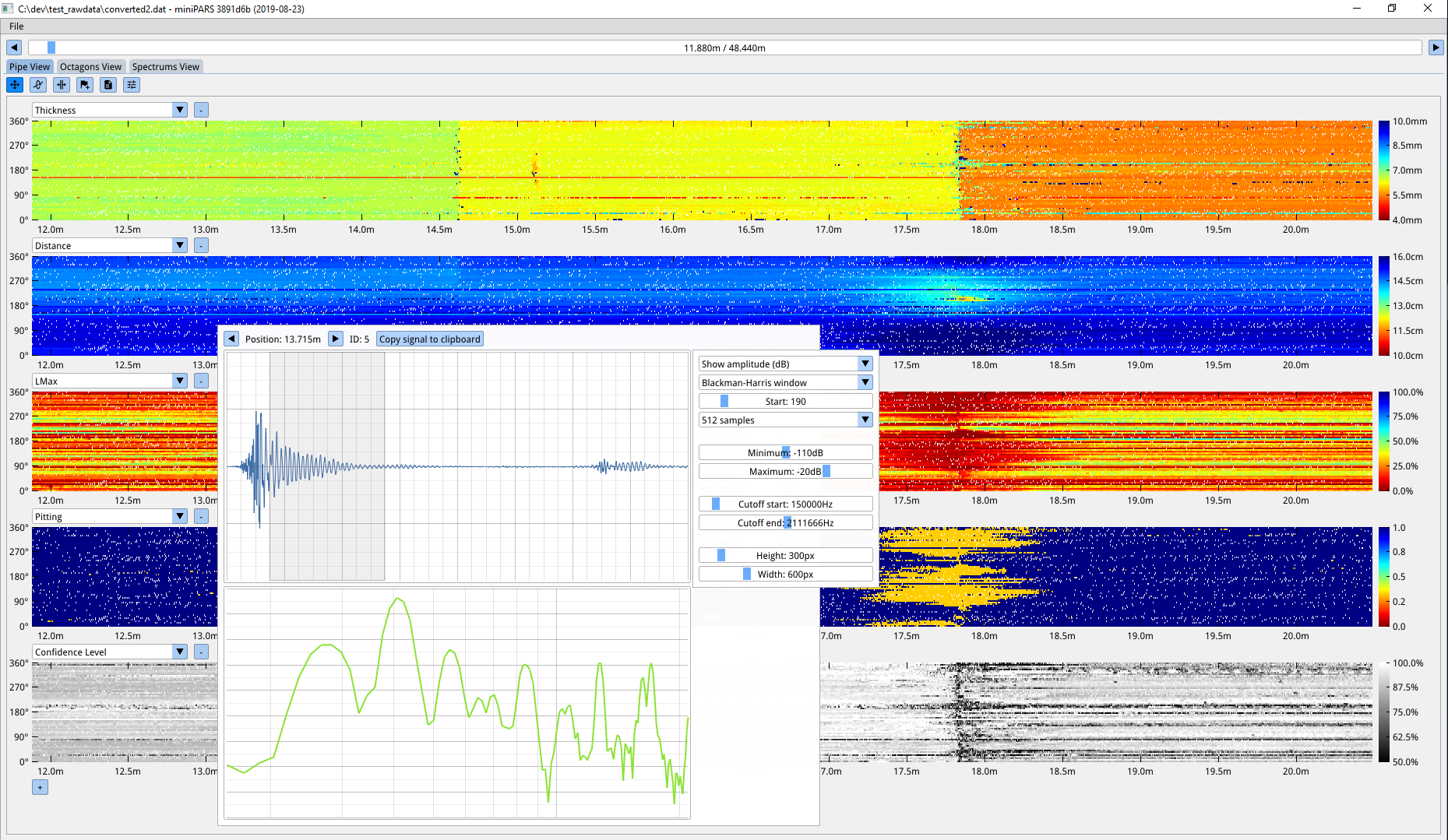
Can you reskin the look of Dear ImGui?
To a degree — colors, sizes, padding, rounding, and fonts are all adjustable. But since it's designed and optimized for debug/dev tools, there's a ceiling on how far you can stray from the default look. It's not intended as an end-user game UI toolkit, though clever use of the low-level API makes it possible.
Example of a reasonably reskinned app (from #2529):
Why C++ instead of C?
Dear ImGui uses a small, deliberate subset of C++11 — nothing approaching heavy template metaprogramming. It avoids C++ headers entirely. Function overloading and default parameters keep the API terse and easy to use; giving those up would make it noticeably more cumbersome. Namespaces, constructors, and light template use (e.g. ImVector<>) are also relied on for convenience.
For other languages, there's an auto-generated C API, cimgui (by Sonoro1234 and Stephan Dilly), meant as a base for further bindings. If possible, try to replicate overloading/default-parameter ergonomics in your target language rather than exposing the raw C API directly. See the Bindings wiki page for existing options.
Community
How can I help?
- Businesses: if your company uses Dear ImGui, reach out to
omar AT dearimgui.comto discuss invoiced technical support, maintenance, or sponsorship — one of the most impactful ways to help, since it funds more people working on the project. See the Funding page. - Individuals: PayPal donations are welcome — see the README.
- Experienced with C++ and Dear ImGui? Browse Issues, Discussions, the Wiki, and docs/TODO.txt to find something to work on.
- Disclose your usage: a blog post, tweet, screenshot, or mention — post visuals in the gallery threads. This builds the library's credibility and helps other teams make decisions.
- Share your issues: even an incomplete PR or a hard problem you ran into is useful to the project, whether or not you expect support back.