 0aed89e880
When ImGuiFreeTypeLoaderFlags_LoadColor is set, add FT_LOAD_RENDER to the
FreeType LoadFlags so color glyphs (COLR/COLRv1/sbix/CBDT) produce a BGRA
bitmap immediately during FT_Load_Glyph. In FontBakedLoadGlyph, skip the
subsequent FT_Render_Glyph(slot, FT_RENDER_MODE_NORMAL) when the glyph is
already a bitmap (slot->format == FT_GLYPH_FORMAT_BITMAP), because
re-rendering with FT_RENDER_MODE_NORMAL discards the color layers and, for
pure-COLR glyphs (no traditional outline), yields an empty bitmap -- so
color emoji never bakes and AddText renders nothing.

Monochrome fonts are unaffected: they have no color layers, so
FT_LOAD_COLOR is a no-op for them and the existing FT_RENDER_MODE_NORMAL
path runs as before (slot->format stays FT_GLYPH_FORMAT_OUTLINE until the
explicit FT_Render_Glyph call).
imgui_freetype
Build font atlases using FreeType instead of stb_truetype (which is the default font rasterizer).
by @vuhdo, @mikesart, @ocornut.
Usage
- Get latest FreeType binaries or build yourself (under Windows you may use vcpkg with
vcpkg install freetype --triplet=x64-windows,vcpkg integrate install). - Add imgui_freetype.h/cpp alongside your project files.
- Add
#define IMGUI_ENABLE_FREETYPEin your imconfig.h file to make Dear ImGui automatically use the imgui_freetype loader. If your copy Dear ImGui is precompiled, you can always enable imgui_freetype by calling ImFontAtlas::SetFontLoader().
About Gamma Correct Blending
FreeType assumes blending in linear space rather than gamma space. See FreeType note for FT_Render_Glyph. For correct results you need to be using sRGB and convert to linear space in the pixel shader output. The default Dear ImGui styles will be impacted by this change (alpha values will need tweaking).
Testbed for toying with settings (for developers)
See https://gist.github.com/ocornut/b3a9ecf13502fd818799a452969649ad
Known issues
- Oversampling settings are ignored but also not so much necessary with the higher quality rendering.
Comparison
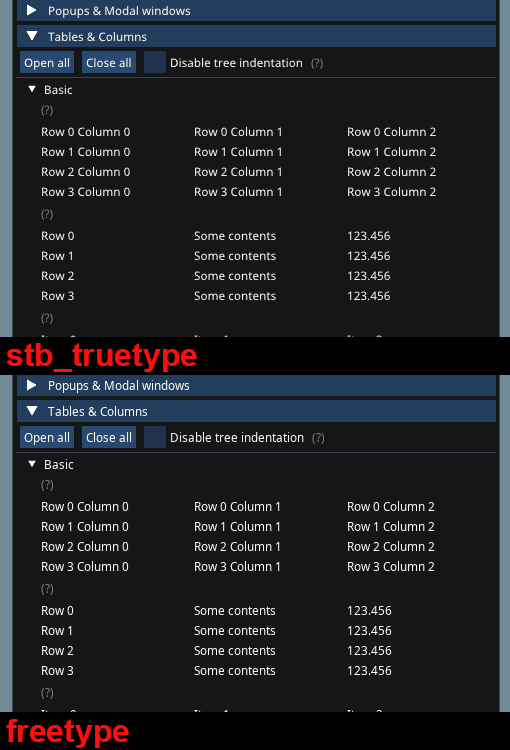
Small, thin anti-aliased fonts typically benefit a lot from FreeType's hinting:
Colorful glyphs/emojis
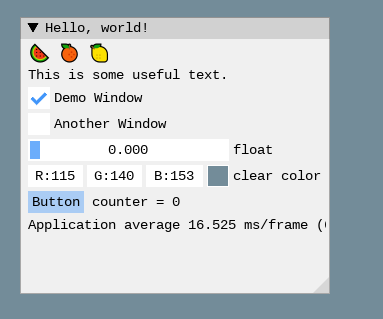
You can use the ImGuiFreeTypeBuilderFlags_LoadColor flag to load certain colorful glyphs. See the
"Using Colorful Glyphs/Emojis" section of FONTS.md.
Using OpenType SVG fonts (SVGinOT)
- SVG in Open Type is a standard by Adobe and Mozilla for color OpenType and Open Font Format fonts. It allows font creators to embed complete SVG files within a font enabling full color and even animations.
- Popular fonts such as twemoji and fonts made with scfbuild is SVGinOT.
- Two alternatives are possible to render SVG fonts: use "lunasvg" or "plutosvg". plutosvg will support some more fonts (e.g. NotoColorEmoji-Regular) and may load them faster.
Using lunasvg
Requires: lunasvg v2.3.2 and above
- Add
#define IMGUI_ENABLE_FREETYPE_LUNASVGin yourimconfig.h. - Get latest lunasvg binaries or build yourself. Under Windows you may use vcpkg with:
vcpkg install lunasvg --triplet=x64-windows.
Using plutosvg (and plutovg)
- Add
#define IMGUI_ENABLE_FREETYPE_PLUTOSVGin yourimconfig.h. - Get latest plutosvg binaries or build yourself. Under Windows you may use vcpkg with:
vcpkg install plutosvg --triplet=x64-windows. Alternatively, if you build imgui from vcpkg, you just need to enable the plutosvg feature:vcpkg install imgui[plutosvg] --triplet=x64-windows - If you prefer to build plutosvg manually:
- Compilation hints for plutovg: Compile all source files in
plutovg/source/*.c+ Add include directory:plutovg/include+plutovg/stb - Compilation hints for plutosvg: Compile
plutosvg/source/plutosvg.c+ Add include directory:plutosvg/source+ Add define:PLUTOSVG_HAS_FREETYPE+ Link with: plutovg, freetype
- Compilation hints for plutovg: Compile all source files in